Getting started with Preview Environments
Preview Environments give every pull request its own fully deployed instance of your application. Reviewers can interact with the changes live, without cloning the branch or running anything locally. When the pull request is merged or closed, the environment is automatically destroyed.
In this tutorial, you will configure two GitHub Actions workflows for the Movies sample application: one that deploys a preview environment when a pull request is opened, and one that cleans it up when the pull request is closed. You will also add end-to-end tests that run automatically against each preview.
Learn more about how Preview Environments work in the Preview Environments overview.
Prerequisites
- Access to an Okteto instance
- Okteto CLI installed and configured
- A GitHub account
- A fork of the Movies sample application
Step 1: Fork the sample application
Fork the Movies repository to your own GitHub account. This microservices application includes a React frontend, a Node.js catalog service, a Java rent service, Go API and worker services, and supporting infrastructure (PostgreSQL, Kafka, MongoDB).
The repository already has an Okteto manifest (okteto.yaml) that defines how to build and deploy all services, and a test section for end-to-end tests using Playwright.
Step 2: Configure your GitHub secrets
The GitHub Actions workflows authenticate with Okteto using two secrets. Create them in your fork under Settings > Secrets and variables > Actions > New repository secret:
| Secret | Value |
|---|---|
OKTETO_TOKEN | An Admin Access Token from your Okteto instance |
OKTETO_CONTEXT | The URL of your Okteto instance (e.g., https://okteto.example.com) |
The workflow also uses GITHUB_TOKEN, which GitHub populates automatically. You do not need to create it.
Step 3: Create the deploy workflow
Create the file .github/workflows/preview.yaml in your fork. This workflow triggers whenever a pull request targets the main branch:
# file: .github/workflows/preview.yaml
on:
  pull_request:
    branches:
      - main

concurrency:
  group: ${{ github.workflow }}-${{ github.ref }}
  cancel-in-progress: false

jobs:
  preview:
    runs-on: ubuntu-latest
    steps:
      - name: Context
        uses: okteto/context@latest
        with:
          url: ${{ secrets.OKTETO_CONTEXT }}
          token: ${{ secrets.OKTETO_TOKEN }}

      - name: Deploy preview environment
        uses: okteto/deploy-preview@latest
        env:
          GITHUB_TOKEN: ${{ secrets.GITHUB_TOKEN }}
        with:
          name: pr-${{ github.event.number }}
          scope: global
          timeout: 15m
The workflow does three things:
- Authenticates with your Okteto instance using
okteto/context - Deploys a preview environment named
pr-<number>usingokteto/deploy-preview, which builds all container images and runs thedeploycommands from your Okteto manifest - Posts a comment on the pull request with the URL of the preview environment (this requires the
GITHUB_TOKEN)
Setting scope: global makes the preview visible to all members of your Okteto instance. This is required when using Admin Access Tokens.
Always set cancel-in-progress: false for preview environment workflows. Setting it to true cancels in-progress deployments, which can leave your preview environment in an inconsistent state or cause resource leaks.
Step 4: Add end-to-end tests
Extend the deploy workflow to run tests against the preview environment after it deploys. Add these steps after the Deploy preview environment step:
      - name: Checkout code
        uses: actions/checkout@v4

      - name: Run end-to-end tests
        uses: okteto/test@latest
        with:
          tests: e2e
          namespace: pr-${{ github.event.number }}

      - name: Save test report
        uses: actions/upload-artifact@v4
        if: ${{ !cancelled() }}
        with:
          name: playwright-report
          path: tests/playwright-report/
          retention-days: 30
The okteto/test action runs the e2e test container defined in okteto.yaml. The Movies app includes a Playwright test suite that verifies the application works end-to-end. Test artifacts are uploaded to GitHub so you can download and review them if a test fails.
The complete .github/workflows/preview.yaml file should look like this:
# file: .github/workflows/preview.yaml
on:
  pull_request:
    branches:
      - main

concurrency:
  group: ${{ github.workflow }}-${{ github.ref }}
  cancel-in-progress: false

jobs:
  preview:
    runs-on: ubuntu-latest
    steps:
      - name: Context
        uses: okteto/context@latest
        with:
          url: ${{ secrets.OKTETO_CONTEXT }}
          token: ${{ secrets.OKTETO_TOKEN }}

      - name: Deploy preview environment
        uses: okteto/deploy-preview@latest
        env:
          GITHUB_TOKEN: ${{ secrets.GITHUB_TOKEN }}
        with:
          name: pr-${{ github.event.number }}
          scope: global
          timeout: 15m

      - name: Checkout code
        uses: actions/checkout@v4

      - name: Run end-to-end tests
        uses: okteto/test@latest
        with:
          tests: e2e
          namespace: pr-${{ github.event.number }}

      - name: Save test report
        uses: actions/upload-artifact@v4
        if: ${{ !cancelled() }}
        with:
          name: playwright-report
          path: tests/playwright-report/
          retention-days: 30
Step 5: Create the cleanup workflow
Create a second workflow at .github/workflows/preview-closed.yaml that destroys the preview environment when the pull request is closed or merged:
# file: .github/workflows/preview-closed.yaml
on:
  pull_request:
    types:
      - closed

jobs:
  closed:
    runs-on: ubuntu-latest
    steps:
      - name: Context
        uses: okteto/context@latest
        with:
          url: ${{ secrets.OKTETO_CONTEXT }}
          token: ${{ secrets.OKTETO_TOKEN }}

      - name: Destroy preview environment
        uses: okteto/destroy-preview@latest
        with:
          name: pr-${{ github.event.number }}
This triggers on the closed event type, which fires for both merged and unmerged pull requests. The okteto/destroy-preview action removes all resources associated with the preview environment.
Step 6: Open a pull request
Commit both workflow files to a new branch and open a pull request against main:
git checkout -b add-preview-workflows
git add .github/workflows/preview.yaml .github/workflows/preview-closed.yaml
git commit -m "Add preview environment workflows"
git push origin add-preview-workflows
Open a pull request from this branch in your GitHub repository.
Step 7: Verify the preview environment
After opening the pull request, navigate to the Checks tab. You should see the preview workflow running:
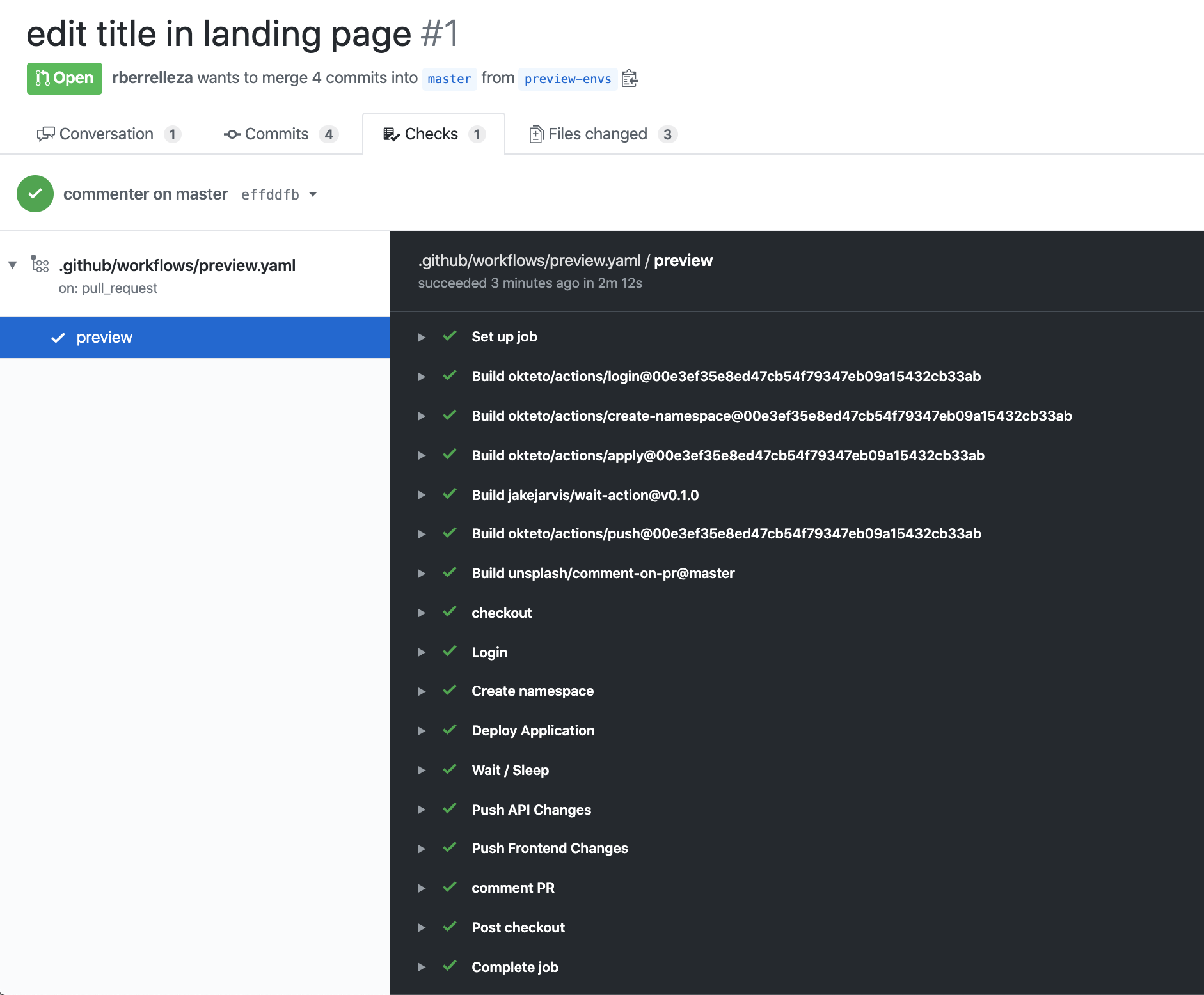
Once the deployment completes, the deploy-preview action posts a comment on the pull request with the URL of your preview environment:
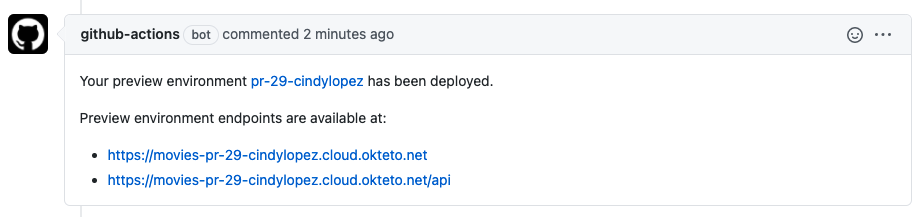
Click the URL to open the Movies application running in your preview environment. The end-to-end tests run automatically after the deployment, and the results appear in the workflow logs.
Every time you push a new commit to the branch, the workflow runs again and updates the preview environment with your latest changes.
Step 8: Merge and clean up
When you are satisfied with the changes:
- Merge the pull request in GitHub
- The cleanup workflow triggers automatically and destroys the preview environment
- Verify in the Okteto dashboard that the preview namespace has been removed
Next steps
Congratulations! You deployed your first preview environment with automated testing 🚀
Every pull request in your repository now gets its own live environment, complete with end-to-end test results. Reviewers can interact with changes directly instead of reading diffs.
- Learn more about Preview Environments and how they work
- Explore Okteto Test for more testing patterns
- Configure garbage collection to automatically clean up idle preview environments
- Set up preview environments with GitLab CI/CD if your team uses GitLab
- See the full list of supported GitHub Actions for additional workflow options